Lesson 2.1 · Reading time: ~6 min
Select Data from a Table
The most fundamental operation in SQL is retrieving data from a table. The SELECT statement is used for this purpose.
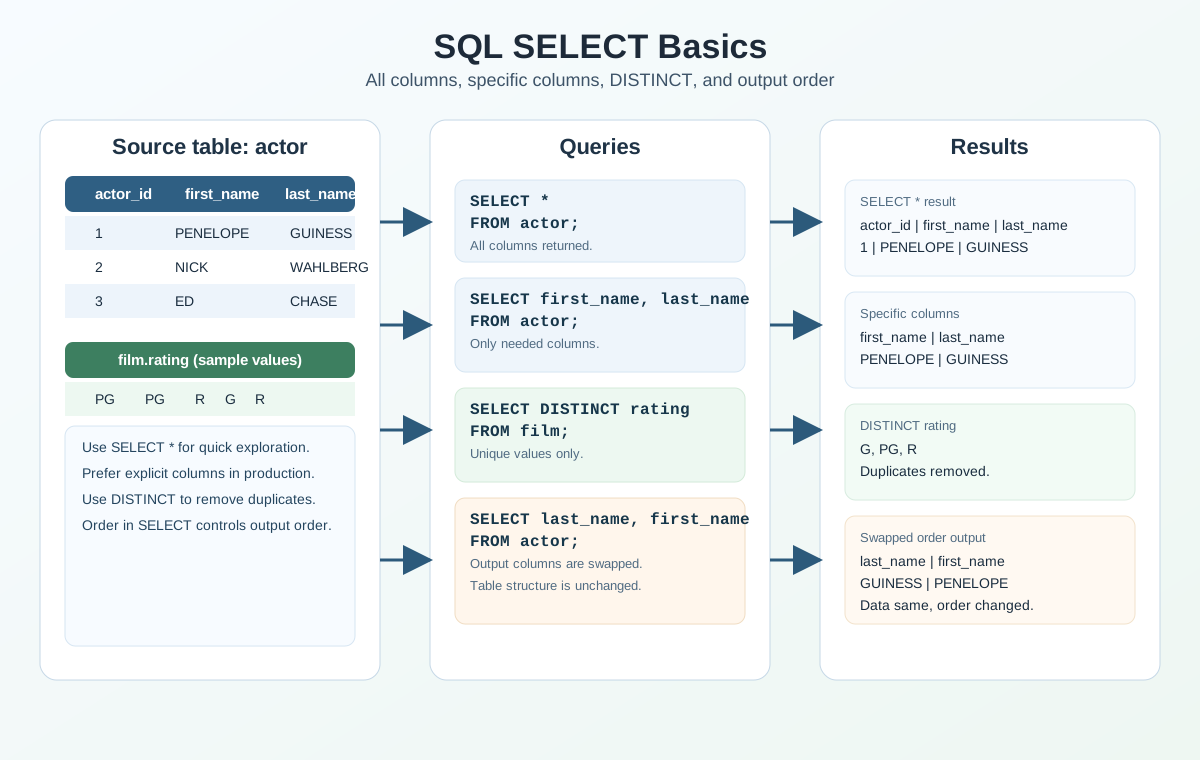
Basic Syntax (Selecting All Columns)
To select all columns from a table, you use the SELECT * syntax:
SELECT *
FROM table_name;
SELECT: This keyword retrieves data from a table.*(Asterisk): Indicates that all columns from the table should be retrieved. The asterisk (*) acts as a wildcard representing all columns in the table.FROM table_name: Specifies the table from which the data is to be retrieved. Replacetable_namewith the actual name of the table you are querying.
Example (Sakila Database)
To select all columns from the actor table in the Sakila database:
SELECT *
FROM actor;
This query will return all rows and all columns (e.g., actor_id, first_name, last_name, last_update) from the actor table.
Avoid Using * to Select All Columns
Using * to select all columns is generally not recommended. While it may seem convenient, it can lead to several issues:
- Performance Impact: Retrieving all columns can increase the amount of data transferred, especially if the table has many columns or large datasets.
- Unintended Changes: If the table schema changes (e.g., new columns are added), queries using
*may return unexpected results. - Readability and Maintenance: Explicitly specifying columns makes the query easier to understand and maintain.
Instead of using *, it is a best practice to explicitly list the columns you need. This approach ensures clarity, reduces the risk of unintended results, and improves query performance.
Selecting Specific Columns
To retrieve specific columns, list their names in the SELECT statement, separated by commas:
SELECT column1, column2, column3
FROM table_name;
SELECT column1, column2, column3: Specifies the columns to retrieve. Replacecolumn1,column2, andcolumn3with the actual column names.FROM table_name: Indicates the table from which to retrieve the data.
Example (Sakila Database)
To retrieve only the first_name and last_name columns from the actor table:
SELECT first_name, last_name
FROM actor;
This query will return all rows, but only the first_name and last_name columns for each actor.
Selecting Unique Values with DISTINCT
Sometimes you do not need every row, but only unique values in a column (or a set of columns). For this, use the DISTINCT keyword.
Basic Syntax
SELECT DISTINCT column_name
FROM table_name;
DISTINCT removes duplicates from the result and keeps only unique rows.
Example (Sakila Database)
Let's get a list of unique film ratings:
SELECT DISTINCT rating
FROM film;
This query returns each rating value only once.
DISTINCT with Multiple Columns
You can also apply DISTINCT to multiple columns. In that case, uniqueness is determined by the combination of values.
SELECT DISTINCT rating, rental_duration
FROM film;
Here, duplicates are removed based on the pair rating + rental_duration.
When to Use DISTINCT
DISTINCT is useful when you:
- build reference lists (for example, unique categories, statuses, or ratings);
- check data quality (are there unexpected repeated values?);
- prepare data for filters and UI controls.
If you only need to check whether a value belongs to a short list,
IN (...)inWHEREis often a better fit. UseDISTINCTspecifically to remove duplicates from the result set.
Column Order in SELECT
The order in which you list columns in the SELECT statement determines their order in the result set. However, it does not alter the column order in the table itself.
Example (Sakila Database)
SELECT last_name, first_name
FROM actor;
In this case, the last_name column will appear before the first_name column in the output, even though first_name might be defined earlier in the table structure. The order in the SELECT statement overrides the default table column order.
Frequently Asked Questions
Can I use SELECT * in real projects?
Yes, but use it intentionally. It is convenient for quick checks and debugging, while production queries are usually safer when they list only required columns.
Does column order in SELECT change the table structure?
No. It only changes the order of columns in query output. The table definition in the database stays the same.
Why avoid SELECT * in APIs and reports?
Because schema changes can add columns automatically to results. That may break API contracts, reports, or client code expecting a fixed set of fields.
Interview Questions
What is the practical risk of SELECT *?
Main risks are extra data transfer, weaker stability when schema changes, and lower readability. In production code, interviewers usually expect explicit column lists.
When can DISTINCT slow down a query?
On large datasets, because the database must do extra work to remove duplicates (often sorting or hashing). Use DISTINCT when uniqueness is required, not by default.
What does SELECT DISTINCT a, b return?
It returns unique (a, b) pairs, not unique values of each column independently.
How do you choose between DISTINCT and WHERE filtering?
Use WHERE to filter rows by conditions. Use DISTINCT to remove duplicates from rows that are already selected.
Key Takeaways from this Lesson:
SELECT *retrieves all columns from a table.SELECT column1, column2, ...retrieves only the specified columns.SELECT DISTINCT column_namereturns only unique values without duplicates.- The order of columns in the
SELECTstatement determines the order in the result set.